
Your team books less and advises more.
GFR books your clients' ongoing bookkeeping into DATEV automatically. Your team makes the decisions and sees the audit trail for every booking.
Entirely in DATEV or with the GFR web app.
Receipts come from the portal your clients already use, for example Kanzleiland. GFR books invisibly in the background, your team works only in DATEV Rechnungswesen.
Clients upload receipts in the GFR web app. Your team only sees what needs a decision there. Bookings go to DATEV Rechnungswesen.
Each morning you see where you are needed.
One view of all your assigned clients: how many decisions are open and how many receipts they settle, what you are waiting for from clients and what is ready for export.
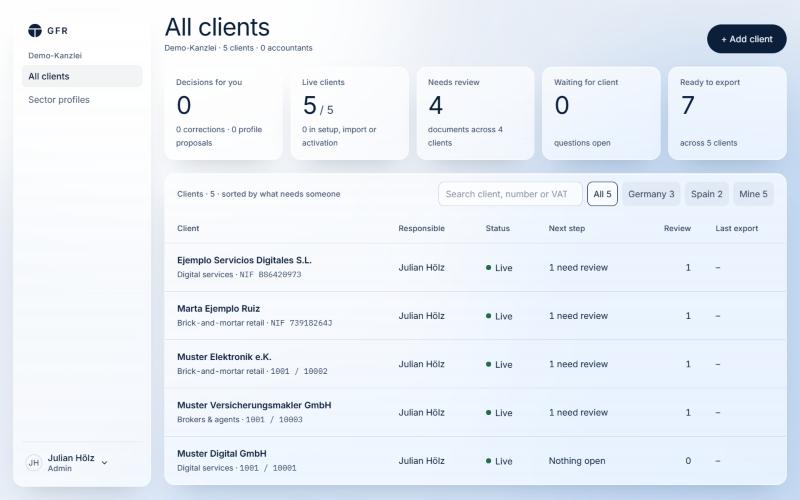
Demo firm with fictional clients.
What stays, and what is new.
Your team keeps booking and reviewing in DATEV Rechnungswesen.
For example Kanzleiland. Nothing changes for your clients.
Who looks after which client stays the same.
SKR03 or SKR04, with your individual accounts.
Every booking with reasoning and an audit trail.
Similar receipts together, reminders and corrections merged.
They adapt with every booking.
Right on the receipt, without email ping-pong.
Who gets what out of it.
More clients with the same team, without compromising the quality that carries your name.
Responsibilities per client, an audit trail for every booking, four-eyes principle for corrections.
GFR books the routine. Your time goes into the cases that need expertise.
Productive in three steps.
- 1Create a client
New, directly in GFR, in about 5 minutes. Or take over an existing client from DATEV.
- 2Activate the DATEV interface
In a few minutes. For existing clients, GFR takes over master data and, where available, previous bookings.
- 3Connect receipt intake
Client portal, for example Kanzleiland, or GFR web app. Then GFR is ready to go, even without history.
- GFR books automatically
From then on routine work runs by itself, your team makes the open decisions.
Try GFR with one client's receipts.
You choose the client, we show what GFR books automatically. For professionals bound by secrecy, with a confidentiality obligation under § 203 StGB and a data processing agreement.